
Table of Contents
- Getting Started
- EO.Pdf
- EO.Web
- Overview
- Installation & Deployement
- EO.Web ToolTip
- EO.Web Rating
- EO.Web Slider & RangeSlider
- EO.Web ListBox
- EO.Web ComboBox
- EO.Web Captcha
- EO.Web ASPX To PDF
- EO.Web Slide
- EO.Web Flyout
- EO.Web EditableLabel
- EO.Web ImageZoom
- EO.Web Floater
- EO.Web Downloader
- EO.Web ColorPicker
- EO.Web HTML Editor
- EO.Web File Explorer
- EO.Web SpellChecker
- EO.Web Grid
- EO.Web MaskedEdit
- EO.Web Splitter
- EO.Web Menu
- EO.Web Slide Menu
- EO.Web TabStrip
- EO.Web TreeView
- EO.Web TreeView
- Overview
- Using EO.Web TreeView
- TreeNode and TreeNodeGroup
- Look, Skin and Theme
- Style and Appearance
- Data Binding
- Handling Event
- EO.Web Calendar
- EO.Web Callback
- EO.Web MultiPage
- EO.Web Dialog
- EO.Web AJAXUploader
- EO.Web ProgressBar - Free!
- EO.Web ToolBar - Free!
- EO.WebBrowser
- EO.Wpf
- Common Topics
- Reference
| Bind to CustomItem's Properties |
Apply to
Overview
EO.Web navigation controls support defining CustomItem inside a TemplateItem. When items are populated, the content of TemplateItem will be copied to each item. You can also bind data source to CustomItem's properties by using ASP.NET data binding expression.
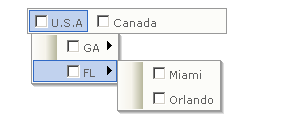
As shown above, data is bound to the "Text" property of the CheckBox, which is the content of the CustomItem.
Since CustomItem is a container control, it can contain not only ASP.NET server controls, but also regular HTML. You can use data binding expression to bind any data to embeded control's properties.
Declare CustomItem in a TemplateItem tag
Most commonly, an embedded custom item is declared within <TemplateItem> tag, which defines the template for navigation item populated during data binding:
<eo:Menu Runat="server" id="menu1">
    <TopGroup>
        <TemplateItem>
            <CustomItem>
                <asp:Button Runat="server" Text="OK"></asp:Button>
            </CustomItem>
        </TemplateItem>
    </TopGroup>
</eo:Menu>
The custom item declared within TemplateItem will be repeatedly created for each navigation item when the control or navigation item group is bound to a data source. You can:
- Have different custom items for different levels;
- Define data binding expression to bind data to the controls in custom item in the tag;
- Handle CustomItemCreated event in code behind;
Bind data to CustomItem's property
When using data binding expressions, Container.DataItem refers to the current data item during data binding. The current data item is the data item used to populate the navigation item. Container.DataItem can be:
| When DataSource is... | Container.DataItem is... |
|---|---|
| DataTable or DataView | DataRowView |
| DataSet | DataRow |
| IDataReader | IDataRecord |
| IEnumerable | The element type |
<TopGroup>
    <TemplateItem>
    <CustomItem>
        <asp:CheckBox CssClass="normal" Runat="server"
            Text='<%#Container.DataItem%>'> </asp:CheckBox>
    </CustomItem>
    </TemplateItem>
</TopGroup>
<!-- We use DataRowView in the data binding expression so we need to put the
following lines on top of the aspx page. -->
<%@ Import namespace="System.Data" %>
<eo:Menu Runat="server" id="menu1">
    <TopGroup>
        <TemplateItem>
            <CustomItem>
                <asp:Button Runat="server"
                    Text='<%#((DataRowView)Container.DataItem)["Country"]%>'></asp:Button>
            </CustomItem>
            <SubMenu>
                <TemplateItem>
                    <CustomItem>
                        <asp:Button Runat="server" Text="Level 2"></asp:Button>
                    </CustomItem>
                </TemplateItem>
            </SubMenu>
        </TemplateItem>
    </TopGroup>
</eo:Menu>
<!-- We use DataRowView in the data binding expression so we need to put the
following line on top of the aspx page. -->
<%@ Import namespace="System.Data" %>
<eo:Menu Runat="server" id="menu1">
    <TopGroup>
        <TemplateItem>
            <CustomItem>
                <asp:Button Runat="server"
                    Text='<%#((IDataRecord)Container.DataItem)["Country"]%>'></asp:Button>
            </CustomItem>
            <SubMenu>
                <TemplateItem>
                    <CustomItem>
                        <asp:Button Runat="server" Text="Level 2"></asp:Button>
                    </CustomItem>
                </TemplateItem>
            </SubMenu>
        </TemplateItem>
    </TopGroup>
</eo:Menu>
You can also use CustomItemCreated event to modify the item before rendering.
