
Table of Contents
- Getting Started
- EO.Pdf
- EO.Web
- Overview
- Installation & Deployement
- EO.Web ToolTip
- EO.Web Rating
- EO.Web Slider & RangeSlider
- EO.Web ListBox
- EO.Web ComboBox
- EO.Web Captcha
- EO.Web ASPX To PDF
- EO.Web Slide
- EO.Web Flyout
- EO.Web EditableLabel
- EO.Web ImageZoom
- EO.Web Floater
- EO.Web Downloader
- EO.Web ColorPicker
- EO.Web HTML Editor
- EO.Web File Explorer
- EO.Web SpellChecker
- EO.Web Grid
- EO.Web MaskedEdit
- EO.Web Splitter
- EO.Web Menu
- EO.Web Slide Menu
- EO.Web TabStrip
- EO.Web TreeView
- EO.Web TreeView
- Overview
- Using EO.Web TreeView
- TreeNode and TreeNodeGroup
- Look, Skin and Theme
- Style and Appearance
- Data Binding
- Handling Event
- EO.Web Calendar
- EO.Web Callback
- EO.Web MultiPage
- EO.Web Dialog
- EO.Web AJAXUploader
- EO.Web ProgressBar - Free!
- EO.Web ToolBar - Free!
- EO.WebBrowser
- EO.Wpf
- Common Topics
- Reference
| Populating from DataSet |
Apply to
Overview
EO.Web navigation controls support populating from a DataSet. The DataSet should contain DataSet.Relations to represent a hierarchical data structure which can map to the control's structure.
How to define hierarchical data structure in a DataSet
Use DataRelation object to define hierarchical relations in a DataSet. Considering a DataSet with the following tables:
Countries table:
| CountryID | CountryName |
|---|---|
| 1 | U.S.A. |
| 2 | Canada |
States table:
| StateID | CountryID | StateName |
|---|---|---|
| 1 | 1 | GA |
| 2 | 1 | FL |
| 3 | 2 | ON |
Cities table:
| CityID | StateID | CityName | CityWebSite |
|---|---|---|---|
| 1 | 1 | Atlanta | http://www.atlantaga.gov |
| 2 | 1 | Savannah | http://www.ci.savannah.ga.us |
| 3 | 2 | Miami | http://www.ci.miami.fl.us |
| 4 | 2 | Orlando | http://www.cityoforlando.net |
| 5 | 3 | Toronto | http://www.city.toronto.on.ca |
Note:
The Nested property of all DataRelation objects must be set to true.
Mapping data field to item's property
When binding to a DataSet as shown above, by default data field value in records
are assigned to an item's Text.Html
property. For example, specifying "CountryName|StateName|CityName
" as DataFields value generates the following menu:
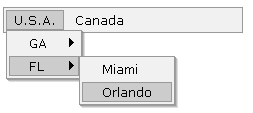
If you intend to assign data field value to other property, you can define one or more DataBinding objects to customize the mapping between a specific data field and a specific property. The code below maps data field "WebSite" to NavigateUrl for the City level navigation items:
<eo:Menu Runat="server" DataFields="CountryName|StateName|CityName">
  <TopGroup>
    <Bindings>
        <eo:DataBinding
            Property="NavigateUrl"
            DataField="CityWebSite"
            Depth="2">
        </eo:DataBinding>
    </Bindings>
  </TopGroup>
</eo:Menu>
Use Depth to specify which level the mapping should be applied to. Depth starts from 0.
Populating a group
EO.Web navigation controls support populating a certain group from a data source. Simple specify the group's DataFields and DataSource properties, then call DataBind method.
Here's a sample of editting a MenuGroup's Bindings property
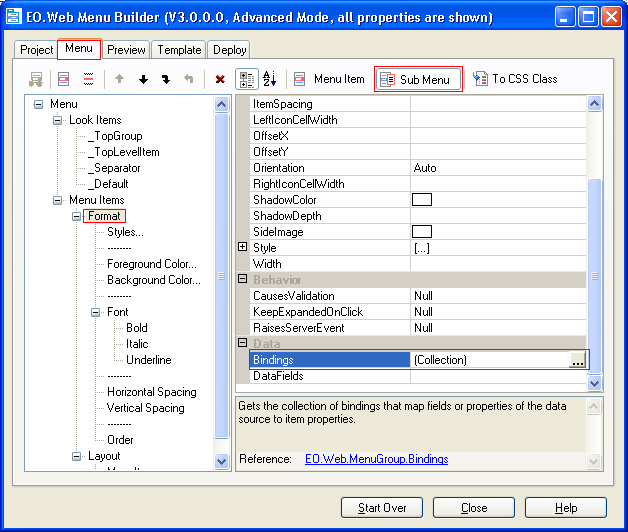
Summary
- Drag an EO.Web navigation control onto the page;
- Create and fill the DataSet object;
- Define one or more DataRelation object in the DataSet and set Nested property to true;
- Set the control or group's DataFields property;
- Optionally, define one or more DataBinding objects for the control or group if you want to define a customized data binding;
- Call DataBind method on the control or group.
